


Group actions let you update multiple CRM items at once. For example, you can convert leads into deals, reassign owners, or send a campaign to a group of contacts.
To apply a group action:
- Open the List view.
- Select the items you want to update.
- Choose an action.
- Enable For all if you want to apply the action to all items across all pages.
- Click Apply.
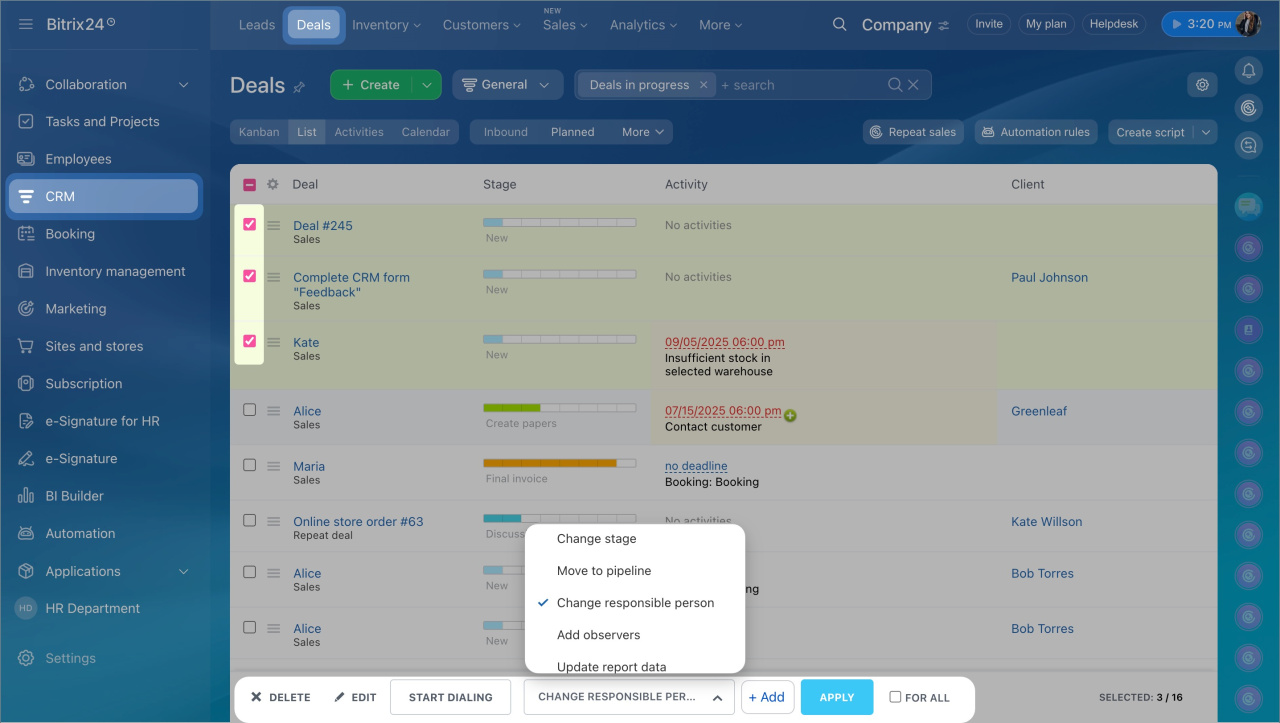
Available actions
Delete. Remove items from CRM. Deleted items are not included in reports. You can restore them from the Recycle Bin within 30 days.
Edit. Update multiple items at the same time.
Create newsletter. Send campaigns by email, SMS, audio call, or voice broadcast. Available for leads, contacts, and companies. You can send up to 5,000 messages at once.
Create campaign
Add to segment. Add items to a customer segment. Use segments to group customers by shared attributes, such as location or purchase history.
Customer segments
Add task. Create one task linked to all selected items. The task appears in each item’s timeline as an activity.
Create a task
Add activities in CRM
Change stage. Move leads or deals to a different stage.
Statuses and dropdowns
Move to pipeline. Move multiple deals to another pipeline.
Sales pipelines
Change responsible person. Reassign ownership of selected items to another user.
Access problems after editing the company structure
Generate. Convert leads into deals, contacts, or companies.
Create CRM entities from source
Schedule bulk dialing. Create a call list and call contacts immediately or at a scheduled time.
Automatic Dialer
Make public. Update the Available to all field to change access permissions.
Access Permissions in CRM
Update dashboard date. Refresh item data used in CRM reports.
Included in export. Mark contacts as available for export.
Export CRM data
Merge. Combine multiple items into one. If there are no conflicts, CRM merges them automatically.
Merge leads, contacts and companies manually
Merge deals
Add to exceptions. Exclude leads or deals from future processing. CRM will not create new items from this data.
Exceptions
Add observers. Add observers to multiple items at once.
Observers in CRM: Give access to item forms and create a chat for discussion
Restart automation rules. Run automation rules again for selected items. Rules restart from the current stage.
Automation rules in CRM
Available actions may vary in Smart Process Automation (SPA). For example, you can move items between pipelines only if pipelines are configured.
In brief
- Group actions help you manage multiple CRM items at once.
- Use List view to select items and apply actions.
- Available actions depend on the item type and your CRM setup.



