
🚚 Miễn phí giao hàng toàn quốc

✅ Tặng Gói Hỗ trợ online trọn đời

✅ Giá cạnh tranh nhất thị trường

✅ Miễn phí tư vấn giải pháp

🚚 Miễn phí giao hàng toàn quốc

✅ Tặng Gói Hỗ trợ online trọn đời

✅ Giá cạnh tranh nhất thị trường

✅ Miễn phí tư vấn giải pháp

Hotline: 0943.199.449

Địa chỉ: Tầng 1, tòa nhà Deli, 75 Hoàng Văn Thụ, P. Cầu Kiệu

Bitrix24 Helpdesk

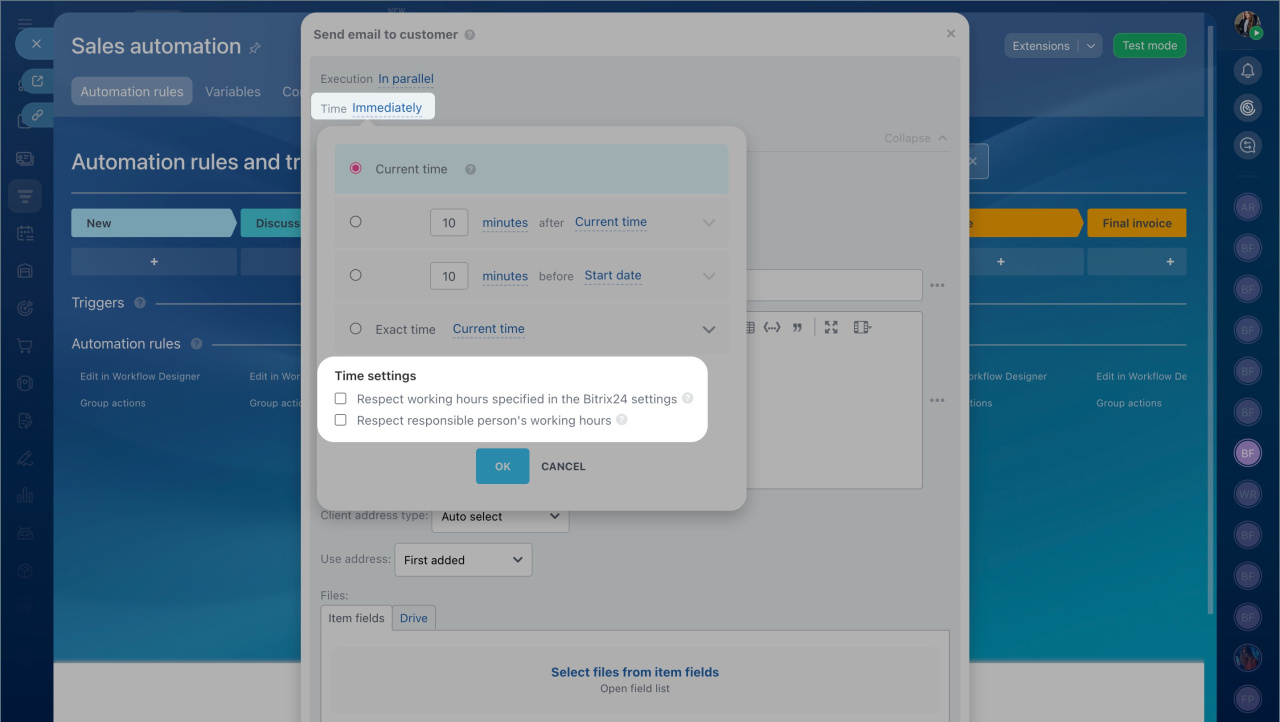
Time settings: Respect the responsible person’s working hours

You can configure an automation rule to follow the working hours of the assigned employee. The rule will pause and resume when the employee starts their workday or returns from a break.

Use this option when timing matters. For example, if a rule sends a message or email after a few days, it’s better to wait until the responsible manager is available. This helps avoid delays in customer communication and reduces the risk of losing a deal.

This option is available only if:
  • Worktime tracking is included in your plan.
  • Worktime tracking is enabled in your account settings.
Worktime

How it works

  1. Open the automation rule settings.
  2. Click Time.
  3. Select Respect responsible person’s working hours.

The rule uses the schedule of the employee assigned to the CRM item.

If worktime tracking is also enabled, the rule runs only when both conditions are met:

  • The employee is within their working hours.
  • The employee is actively working (based on time tracking).
Was this information helpful?
Thank you for your feedback.
Get Implementation Help from a Partner
That's not what I'm looking for
Complicated and incomprehensible text
The information is outdated
It's too short. I need more information
I don't like the way this tool works
Get your Bitrix24 set up by local professionals
FIND BITRIX24 PARTNER NEAR ME
implementation_helper_man
Go to Bitrix24
Don't have an account? Create for free
Related articles
Sales automation in CRM Automation rules: Products Automation rules in CRM Helper automation rules Profit calculation Triggers in CRM Automation rules: Manage workflow items Automation rules: Workflow automation QR code automation with rules and triggers Automation rules: Employee alerts
Zalo
0943.199.449

