🚚 Miễn phí giao hàng toàn quốc

✅ Tặng Gói Hỗ trợ online trọn đời

✅ Giá cạnh tranh nhất thị trường

✅ Miễn phí tư vấn giải pháp

🚚 Miễn phí giao hàng toàn quốc

✅ Tặng Gói Hỗ trợ online trọn đời

✅ Giá cạnh tranh nhất thị trường

✅ Miễn phí tư vấn giải pháp

Hotline: 0943.199.449

Địa chỉ: Tầng 1, tòa nhà Deli, 75 Hoàng Văn Thụ, P. Cầu Kiệu

Bitrix24 Helpdesk

Record audio and video calls

To record calls, use the Bitrix24 desktop app. Recording is not available in the web version. Reconnect to the call from the desktop app to start recording.


Download and install the desktop app

If you don’t have the app, download and install it:

After installation:

  1. Sign in to your Bitrix24 account.
  2. Rejoin the call from the desktop app.
  3. Click Record.

Recording behavior

  • If multiple users share screens, the recording captures only the screen of the person who started the recording.

Recording format and storage

  • Format: WebM

If Bitrix24 Drive sync is enabled:

  • The recording is saved to your personal drive in Bitrix24.
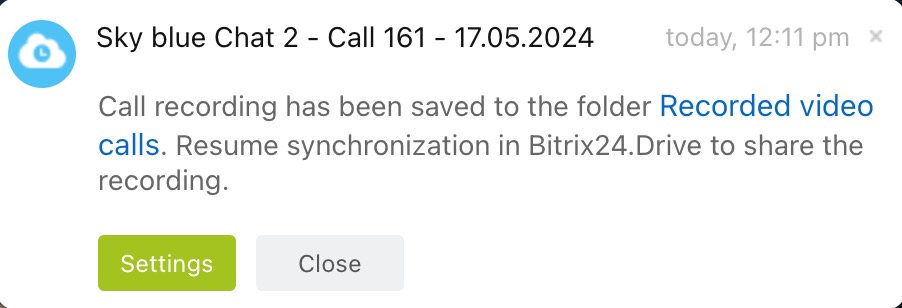
  • A copy is saved to the Recorded video calls folder on your computer.
  • To share the recording in chat, click Share call recording.

If sync is disabled:

  • The recording is saved only to the Recorded video calls folder on your computer.
  • The folder is created automatically.

Desktop app features

The desktop app includes features not available in the web version:

  • Record calls
  • Change your background
  • Use 3D avatars
  • Sync Bitrix24 Drive with your computer

For full functionality, use the desktop app.


Was this information helpful?
Thank you for your feedback.
Get Implementation Help from a Partner
That's not what I'm looking for
Complicated and incomprehensible text
The information is outdated
It's too short. I need more information
I don't like the way this tool works
Get your Bitrix24 set up by local professionals
FIND BITRIX24 PARTNER NEAR ME
implementation_helper_man
Go to Bitrix24
Don't have an account? Create for free
Related articles
Technical requirements for video calls Bitrix24 Sync: Test video call quality Bitrix24 Sync Bitrix24 Sync: Meeting brief and document creation during a call Create a task or an event from a message Create Zoom meetings from CRM and chats Fix video conferencing issues Video conferencing in Bitrix24
Zalo
0943.199.449