
🚚 Miễn phí giao hàng toàn quốc

✅ Tặng Gói Hỗ trợ online trọn đời

✅ Giá cạnh tranh nhất thị trường

✅ Miễn phí tư vấn giải pháp

🚚 Miễn phí giao hàng toàn quốc

✅ Tặng Gói Hỗ trợ online trọn đời

✅ Giá cạnh tranh nhất thị trường

✅ Miễn phí tư vấn giải pháp

Hotline: 0943.199.449

Địa chỉ: Tầng 1, tòa nhà Deli, 75 Hoàng Văn Thụ, P. Cầu Kiệu

Bitrix24 Helpdesk

Access problems after editing the company structure

If you update your company structure—for example, change a department manager or move an employee to another department—you may run into CRM access issues.
Company Structure overview

To fix this, open the CRM records affected by the change and save them again. You can reassign the same responsible person or turn on the Available to everyone option.
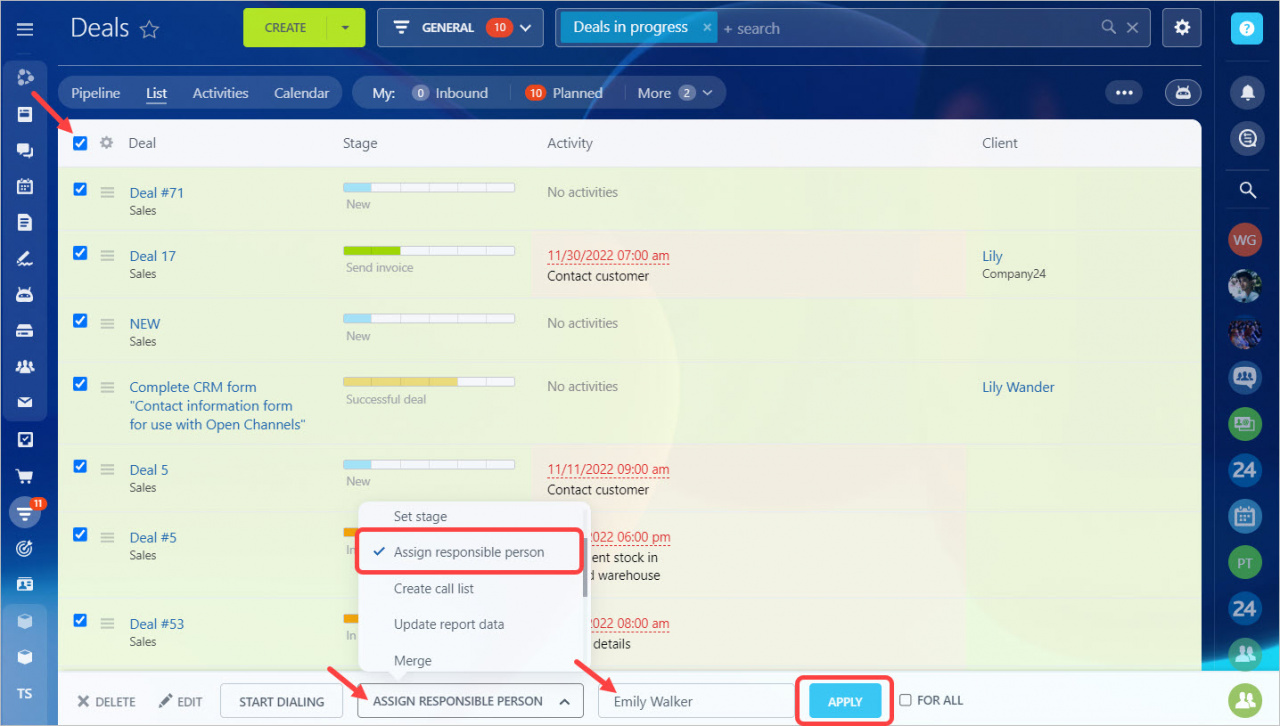
You only need to update records that were created before the structure change. Once you resave them, access will be restored.

Was this information helpful?
Thank you for your feedback.
Get Implementation Help from a Partner
That's not what I'm looking for
Complicated and incomprehensible text
The information is outdated
It's too short. I need more information
I don't like the way this tool works
Get your Bitrix24 set up by local professionals
FIND BITRIX24 PARTNER NEAR ME
implementation_helper_man
Go to Bitrix24
Don't have an account? Create for free
Related articles
Configure access permissions for activities in CRM Set permissions to control product visibility in the online store Access permissions for CRM documents Configure import and export permissions Inventory access permissions: Control who can edit selling prices Configure access permissions for CRM forms Inventory access permissions Configure access permissions to change product prices in CRM forms Role-based access permissions in CRM Access permissions conflict in CRM
Zalo
0943.199.449
