
🚚 Miễn phí giao hàng toàn quốc

✅ Tặng Gói Hỗ trợ online trọn đời

✅ Giá cạnh tranh nhất thị trường

✅ Miễn phí tư vấn giải pháp

🚚 Miễn phí giao hàng toàn quốc

✅ Tặng Gói Hỗ trợ online trọn đời

✅ Giá cạnh tranh nhất thị trường

✅ Miễn phí tư vấn giải pháp

Hotline: 0943.199.449

Địa chỉ: Tầng 1, tòa nhà Deli, 75 Hoàng Văn Thụ, P. Cầu Kiệu

Bitrix24 Helpdesk

Header tags

H1–H5 tags define the structure of a webpage. They help search engines understand page content, which can improve search visibility.

The H1 tag is the most important heading on a page. It usually describes the main topic.

In Bitrix24.Sites, block headers already use heading tags, but H1 is not added automatically. You need to assign it manually.

Add an H1 tag

  1. Open the page in the editor.
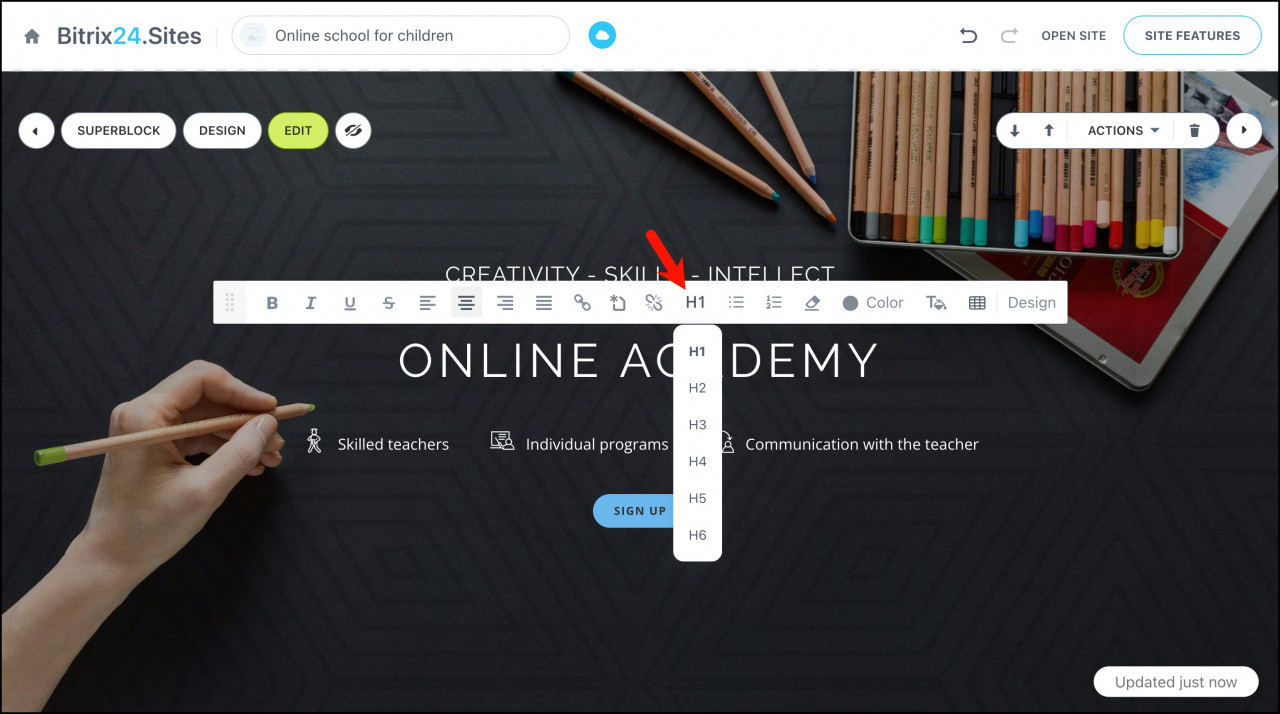
  2. Click the text header inside a block.
  3. Select the H1 tag.
The H1 tag does not change how the block looks. It only defines the page structure.
Recommendations

  • Use only one H1 tag per page.
  • The H1 tag should contain text only.
  • Include relevant keywords, but keep the text natural and readable.
  • Do not duplicate the page title in the H1 tag. Write a unique heading instead.

Was this information helpful?
Thank you for your feedback.
Get Implementation Help from a Partner
That's not what I'm looking for
Complicated and incomprehensible text
The information is outdated
It's too short. I need more information
I don't like the way this tool works
Get your Bitrix24 set up by local professionals
FIND BITRIX24 PARTNER NEAR ME
implementation_helper_man
Go to Bitrix24
Don't have an account? Create for free
Related articles
Auto publish, site preview, and navigation Graphics editor in Bitrix24 Sites Add Google Maps block to your website Webpage title Optimize your site or store for mobile devices Animation in Bitrix24 Sites Save blocks as templates and create folder structure Create and configure a multilingual site Create a multi-page website CoPilot in sites: how to create an image
Zalo
0943.199.449
