
🚚 Miễn phí giao hàng toàn quốc

✅ Tặng Gói Hỗ trợ online trọn đời

✅ Giá cạnh tranh nhất thị trường

✅ Miễn phí tư vấn giải pháp

🚚 Miễn phí giao hàng toàn quốc

✅ Tặng Gói Hỗ trợ online trọn đời

✅ Giá cạnh tranh nhất thị trường

✅ Miễn phí tư vấn giải pháp

Hotline: 0943.199.449

Địa chỉ: Tầng 1, tòa nhà Deli, 75 Hoàng Văn Thụ, P. Cầu Kiệu

Bitrix24 Helpdesk

Animation in Bitrix24 Sites

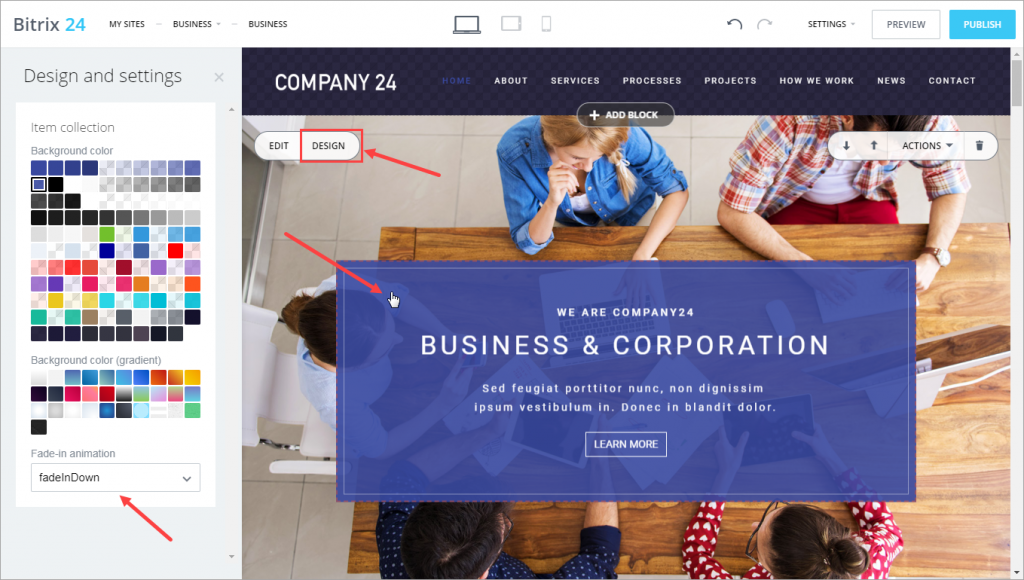
You can now use animations in Bitrix24 Sites.


Website block animation

Open Design and select the block you want to animate. In the Fade-in animation section, choose an animation type. Depending on the block, you can apply animations to different elements.

By default, animations are enabled for all blocks.
Was this information helpful?
Thank you for your feedback.
Get Implementation Help from a Partner
That's not what I'm looking for
Complicated and incomprehensible text
The information is outdated
It's too short. I need more information
I don't like the way this tool works
Get your Bitrix24 set up by local professionals
FIND BITRIX24 PARTNER NEAR ME
implementation_helper_man
Go to Bitrix24
Don't have an account? Create for free
Related articles
Optimize your site or store for mobile devices Create and configure your Bitrix24 site Header tags Webpage title Create a multi-page website Auto publish, site preview, and navigation Create and configure a multilingual site Save blocks as templates and create folder structure CoPilot in sites: how to create an image Add Google Maps block to your website
Zalo
0943.199.449

